Online privacy is no longer guaranteed. From advertisers and data brokers to governments and cybercriminals, countless entities track what you do online, often without your consent. That’s where Tor Browser comes in. Designed to protect your identity and location, Tor (The Onion Router) allows you to browse the internet anonymously by routing your traffic through a global network of encrypted servers.
But it is often misunderstood. Many associate it solely with the dark (hidden) web or illegal activity, raising questions about its safety and legality. In reality, millions of people rely on this anonymous network browser every day for legitimate reasons, including journalists, activists, researchers, and privacy-conscious users.
This 2026 guide explains what Tor Browser is, how it works, and whether it’s still safe to use in today’s surveillance-driven internet. You’ll learn how to use it safely, understand its limitations, and decide if it’s the right tool for your privacy needs.
What is Tor Browser?
Before using any tool, it’s important to understand what it does and how it works. So, what exactly is this browser all about?
Tor Browser is a privacy-focused web browser based on Firefox, designed to hide your identity and location online. The name “Tor” stands for The Onion Router, a reference to its layered encryption system. When you browse with Tor, your traffic is wrapped in multiple layers of encryption like an onion to protect your data.
Unlike traditional, normal browsers such as Chrome, Edge, or Safari, it doesn’t send your traffic directly to websites. Instead, it routes your connection through at least three randomly selected servers, known as nodes or relays, spread across the globe. Each relay only knows the previous and next step, never the full path, making tracking extremely difficult.
Tor’s technology originated in the U.S. Naval Research Laboratory in the 1990s to secure sensitive communications. The Tor Project, a nonprofit organization dedicated to advancing privacy, freedom, and open-source technology, later released it to the public and now maintains it.
As online surveillance and data tracking increase, the tool’s popularity continues to grow. As of January 2026, the network operates over 8,000 active Tor relays, enabling millions of users to browse anonymously. This strong privacy protection makes Tor a trusted tool for journalists, whistleblowers, activists, and everyday users who value online privacy.
Advantages of Using Tor Browser: Key Use Cases
Now that we know what Tor is, let’s explore why people use it and why millions are switching from traditional browsers to it.
When you hear someone mention Tor, the first thing that usually comes to mind is illicit activities on the dark net. Well, you’re not to blame here because its design has made it the criminal’s favorite tool. But that is far from the reality—not everyone using Tor is doing bad things with it, about 80% of Tor users actually use it to stay anonymous while doing their normal day-to-day browsing on public websites.
Only a small percentage use it to access hidden services, meaning that for most people, this privacy browser is just a way to protect their everyday legitimate browsing activities, not to access the hidden web services in any way.
That said, here are some of the legit things people use this browser for:
- Privacy protection: It helps you fly under the radar when online by hiding your IP; that way, it keeps your ISP, websites, trackers, and other snoops from knowing your location and what you do online. This is very important if you’re doing sensitive research or you just don’t want companies building advertising profiles on you.
- Bypass censorship: Individuals under restrictive regimes (countries where there are strict internet controls) use Tor to access news sites, social media, and communication platforms blocked by their government. For example, between the end of October 2025 and the beginning of January 2026, approximately 78,000 people per day connected to Tor in Russia via bridges. After Russia is the US, followed by Iran, with just over 9,700 Tor users connecting through bridges. This is proof of how it is helping people in these oppressive regimes enjoy surfing the web without hindrances.
- A means to access the dark net: Tor provides access to hidden services, often called .onion sites, which aren’t reachable through regular browsers. Today, the Tor network hosts over 65,000 unique .onion URLs. While the darknet often gets a bad reputation, many legitimate resources exist for everyday users, including uncensored news outlets like BBC News, ProPublica, and The Guardian, as well as secure communication tools like SecureDrop, Tor Messenger, and OnionShare. It also hosts anonymous marketplaces; you can read our guide to the top dark web markets to understand this part of the ecosystem.
- Enables secure whistleblowing and journalism without restrictions: Sources can share intel and information with reporters without needing to reveal their identity. A lot of media and news organizations run .onion sites dedicated solely for this purpose.
- Avoiding surveillance: Nowadays, when you’re online, it feels like a thousand eyes are on you, watching your every move – your ISP, hackers, government agencies, all waiting for you to slip up or seeking to hold something on you. With it, you can fly under the radar, and it will be hard for anyone to monitor what you do with your time online.
How Tor Browser Actually Works
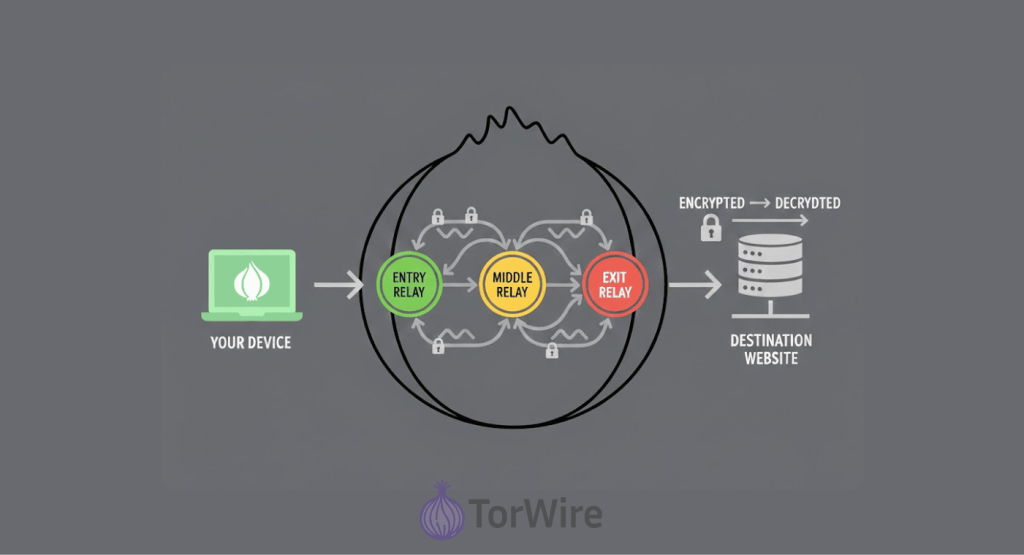
To really get how this anonymizing browser keeps your web browsing anonymous and private, let’s look at how it does its thing.
The Three-Node System
Tor maintains privacy by routing your traffic through a series of volunteer-run Tor nodes via a process called onion routing. Instead of connecting directly to a website, your data travels through a circuit of at least three of these randomly selected relays.
Each route goes through at least three random relays (servers). These servers are run by people who use the Tor Network. So, instead of going right to the web page, your connection goes through three Tor relays that are picked at random.
1. The first of these relays you will connect to is called the entry (or guard) node.
This relay knows your actual IP address (so it knows where your data is coming from), but does not have any idea which web page you are requesting. This means your data is hidden from everyone except the entry node; therefore, it will be encrypted three times (using three layers of encryption).
2. Next comes the middle node.
Tor receives your data through its entry point, where it removes a single layer of security before sending it forward. Your IP address is hidden from Tor, as is the ultimate destination to which your data will arrive.
3. The exit point is the last stage of your connection between your data and the target.
This one removes the final layer of encryption and forwards your request to the actual site. There are about 2,500 exit relays handling this job. The exit node can see the website you want, but not who you are.
So from the website’s side, all it sees is the IP address of the exit node, not yours. Since each relay only knows the server just before and just after it, no single relay can link you to where you’re going online.
Here’s the part that’s honestly pretty brilliant: Tor switches up your path, your ‘circuit,’ every 10 minutes. That constantly changing route makes it extremely hard for anyone to track you.
Layers of Encryption
Now, about that ‘onion’ name; it’s not just a mere metaphor; your data is actually wrapped in layers. Beyond the ability to browse without restriction, when data is sent from your computer to Tor, there are added layers of safety due to multiple layers of security/encryption:
- The outer layer tells the entry node where to send your traffic next.
- The middle layer gives the middle node its next stop.
- The innermost layer holds your actual request.
Each node of the Tor network (relay) takes off one layer of security as it moves the traffic from node-to-node until it reaches the final destination, and when that occurs, all security layers have been stripped from the original data, and at that point, your personal identity cannot be traced back to the data being sent to the website.
How Tor Protects Your Privacy
Apart from the routing tricks this privacy tool uses, it also has other ways to ensure that your browsing is as private and secure as possible:
- Keeps no browsing history. Using Tor’s browser means that no history from previous sessions will be saved or recorded in your browsing history. You will start fresh every time you use it, and then you will have nothing left after you have closed it.
- Another way the software increases its users’ privacy is by resisting fingerprinting. Websites typically can determine what kind of device you are using to visit their site through information collected about various aspects of it (such as screen size, installed fonts, etc). With it, all users appear as a single entity, and this prevents any website from identifying one individual user from another.
- In addition to fingerprinting, it also blocks many third-party tracking devices (cookies) by itself. However, if you log into your personal accounts, you are also undoing a lot of your privacy.
- Finally, Tor attempts to use HTTPS secure connections at all times. Therefore, even if someone is looking at your connection data, it is protected from being viewed at all.
Tor Browser is Safe: A 2026 Analysis of Its Strengths and Risks
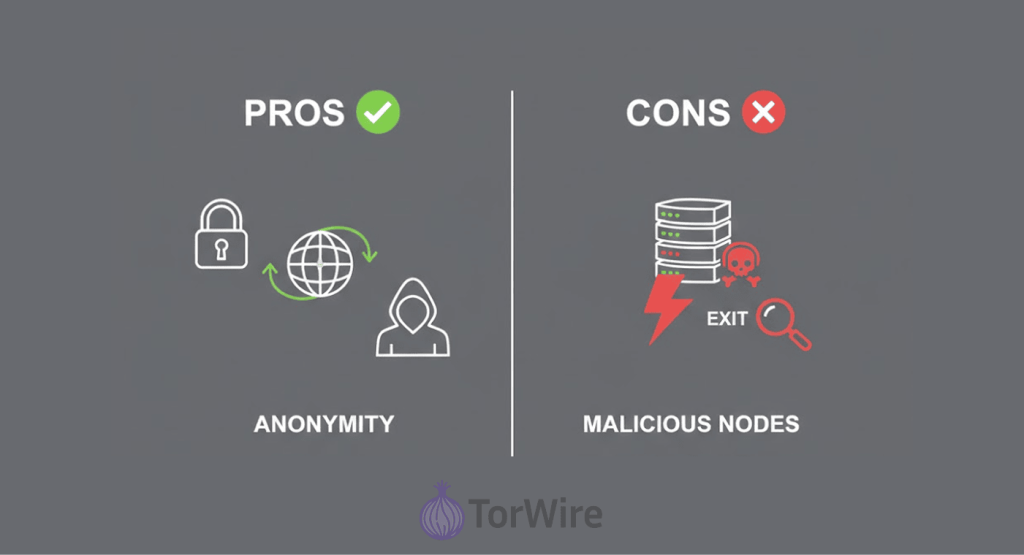
Tor provides a significant amount of additional safety features compared to what most other web browsers offer, but it is not a magic ‘invisibility cloak’.
Privacy-oriented security professionals will tell you that while it has a lot of great features to increase your anonymity online, you will not be completely anonymous. But, like anything, there are catches.
What Tor Gets Right
Tor’s real strength is keeping your online activity private. Tracing anything back to you gets incredibly tough. Even in the unlikely event someone controls both the entry and exit points, they’d need some great skills and resources to actually connect the dots.
The browser itself? Solid. The foundation is based on Firefox, which is outfitted with many Privacy options – mainly to block Trackers and limit Fingerprinting. The tool has recorded over 200 million downloads since mid-2024, a very strong indicator that privacy-minded users don’t want to go without it.
Tor is an open-source project. This means its code is publicly available for anyone to inspect, allowing security experts worldwide to audit it for flaws, contributing to its overall robustness and trustworthiness.
Where Tor Falls Short
Still, like any other tool online, this one isn’t flawless. Cybersecurity researchers have flagged real weaknesses you need to know about:
- Exit node risks: Anyone controlling the exit node has access to any unencrypted information coming from you. So, if you’re sending your connections via HTTP rather than HTTPS, there is a good chance that the administrator for the exit node that your connection was sent through can spy on your activities. There have even been cases where someone ran a bunch of exit nodes just to steal cryptocurrency. Malicious exit nodes are a real thing.
- Entry node exposure: The entry node sees your real IP address. If the entry node is controlled by someone unsavory or an agency of the government, they may know who is using Tor. They still will not be able to see exactly what you are doing, but your anonymity will be compromised.
- Timing attacks: Law enforcement and researchers have used timing analysis to match up who’s using it with specific activities. The Tor Project knows about these attacks, but it’s tough to defend against them, especially if someone has enough resources.
- Human mistakes: Tor can’t save you from yourself. If you log into Facebook or Gmail while using Tor, you basically hand over your identity. Downloading shady files or changing security settings can put you, too.
- Malware on the dark web: There are numerous sketchy websites and downloadable files with viruses or malware on the dark web, and Tor doesn’t protect you from these. You’ll need an antivirus for that.
- Not perfectly anonymous: Even though it makes tracking you more difficult, it’s not infallible, so agencies with enough money and resources may be able to track you if they are able to devote enough time and effort to it. For casual snooping, Tor works great. Against nation-states? Not always.
For everyday browsing, it’s safe enough for most people. But if you want real protection, use it along with a VPN (Virtual Private Network) and decent antivirus software.
Is Tor Browser Illegal?
This is probably the first question that’ll come to the mind of anyone considering using this software: Am I breaking the law by using it?
Let’s be clear about this: in the majority of countries, like the UK, US, Canada, and countries across the EU, using the anonymity browser is legal, like every other privacy tool. Only in places like Iran, China, Russia, Belarus, and North Korea is the use of Tor restricted. In these countries, bypassing state censorship to use it may attract some legal consequences.
In all, the tool in itself is neutral tech, and the assumption that it’s illegal came from the fact that you can use Tor to access the dark web. The dark web is part of the internet, only accessible using special tools like Tor. As we discussed earlier, Tor uses some encryption methods to make the user anonymous when accessing the web — that’s its primary purpose, to grant people privacy online.
However, some people misuse this anonymity; they hide behind it to do all sorts of illegal things—trafficking of drugs, distributing sexual abuse content, offering illicit services, etc. Because the onion web lacks proper policing, these bad actors easily get away with criminal behaviors.
Only a tiny percentage of its users use it for criminal activity; the vast majority actually use it to just do their regular browsing without being watched.
Tor’s Biggest Drawbacks
Before you dive in, you should know what you’re signing up for. These are not total deal breakers, but they can get frustrating if you are not prepared for them:
- It’s slow. Seriously slow: All that encryption and bouncing your traffic around the world means web pages crawl, videos buffer forever, and big downloads are painful. This is a tool for browsing, not streaming your favorite shows.
- Lots of sites block Tor: Some websites flat out refuse to let Tor users in—think banks, streaming platforms, and even online shops. Even when you can get through, you’ll probably be stuck clicking through endless CAPTCHA.
- Limited traffic types: Tor is great for a number of uses, but Torrenting? That’s a no-go because Tor is both slow and can’t handle UDP traffic, meaning some apps just won’t play nice, which will likely make the experience frustrating for you.
- Trusting strangers: The whole Tor network runs on servers managed by volunteers. Most of them mean well, but a few might have shady intentions or be compromised.
- ISP provider: Your ISP knows you’re using Tor and will probably consider your use of Tor to be suspicious, but they won’t have access to the actual information being transferred. Depending on the country where you live, the fact that you’re using Tor alone may trigger an alert to the authorities.
- Advanced attacks are possible: No privacy tool is perfect. If a government controls enough of the Tor network, it can sometimes figure out who’s who by analyzing traffic patterns.
When it comes to regular browsing privacy, a good Virtual Private Network service like NordVPN would normally suffice for most people; however, in certain situations where maximum anonymity is needed, Tor is among the best solutions, despite these negative aspects.
How to Use It Safely and Avoid Risks
Tor enhances privacy by routing your traffic through multiple servers, making tracking difficult, but this also slows browsing speeds. To stay secure and get the most out of Tor, you need to use it correctly. Here’s how:
1. Connect to a Virtual Private Network First
While your ISP can’t see your activity on the onion network, it can still detect that you’re using Tor, which may raise concerns in some regions. To avoid this, connect to a VPN before launching it. It hides Tor usage by encrypting your traffic, making it appear as regular VPN activity.
But not all VPNs can keep up depending on what you’re doing online, but at the basis, ensure any service you choose has the following:
- Robust encryption (usually AES-256)
- Doesn’t keep logs (no-logs policy)
- Servers that are fast and reliable
- A kill switch to cut off the internet and prevent your IP from being exposed should your provider’s connection suddenly fail
2. Keep Official Tor Updated
Bugs and security loopholes are a normal occurrence; in fact, in October of 2024, Firefox and Tor Browser had a big security flaw that was actively being exploited by hackers.
Have your browser upgraded to the latest version (the app often checks for updates itself automatically, but you should still verify if it’s current).
3. Tweak Your Security Settings
Tor Browser has three security levels:
- Standard: Everything works. Good for everyday browsing.
- Safer: Blocks some risky stuff like JavaScript on sketchy sites.
- Safest: Turns off JavaScript completely, and a lot of sites won’t work—but your security’s maxed out.
- Click the shield icon in the top right to change these settings. For regular browsing, Standard is fine. If you’re visiting the dark web, bump it up to Safest.
4. Don’t Log Into Personal Accounts
It might seem obvious, but don’t sign in to anything that reveals your real identity—Facebook, Gmail, Amazon, anything like that. Logging in wipes out your anonymity.
If you absolutely have to check a personal account, use Tor’s “New Identity” feature before switching between accounts. That way, nobody can link them together.
5. Stay Away from Browser Plugins
It is well known that Flash, QuickTime, and other such plugins all tend to expose your real IP address. A default setting in it prevents these types of plugins from leaking any of your data.
Please ensure that this default setting remains enabled. Don’t add any extensions either; they can mess with your privacy.
6. Always Use HTTPS
The Tor exit node can see any data you send without encryption. It routes your traffic through multiple servers with layered encryption, but the system strips away those layers before your data reaches its destination.
As a result, the exit node may expose any unencrypted data. That’s why it’s essential to use HTTPS, the padlock icon in the address bar, which ensures your connection and data remain secure.
Onion Browser has this feature tagged ‘HTTPS Everywhere’. Its goal is to provide encryption for any site that you access that offers it.
7. Just Stick to Websites You Trust
See a weird web address? Just ignore it. Good advice for the whole internet, but super important on Tor and the dark web.
Lots of sites there have strange, random-looking web addresses. It’s hard to tell if you’ll find what you need or find malware or scams. Starting with a vetted list of reputable, popular sites is the safest approach.
You can check the reputation of a .onion site just as easily as on the regular web, so stay cautious. Double-check and ensure you know where the link is leading before you click.
8. Use a Good Security App
Even cautious users can stumble onto malicious sites, which is why a reliable security app is essential. It blocks dangerous websites, prevents malicious downloads, and scans for threats in real time.
Since Tor alone doesn’t protect against malware, pairing it with quality antivirus software adds protection against ransomware and phishing, allowing safer, worry-free browsing.
9. Be Patient—Tor’s Slow
The privacy-first browsing tool puts privacy first, not speed. Pages take longer to load. Don’t mash the refresh button; just wait it out. If a page takes forever, click the circuit icon next to the address bar and pick “New Circuit for this Site.” Sometimes, a fresh route helps.
Tor vs VPN — Which One’s Right for Your Needs?
Tor and VPNs aren’t just two ways to do the same thing—they’re built for different jobs. So it’s not about picking one and forgetting the other, but about what you need right now and choosing the tool that matches. In a dilemma to pick between VPN and the Tor Browser? This comparison can help you decide:
| Feature | Tor Browser | VPN |
|---|---|---|
| Primary goal | Tor’s main purpose is to give users anonymity. In the habit of checking out XYZ.com? No one’ll know it’s you, even the website won’t know. | VPN’s mainly for privacy and security. No one’s gonna know about those weird online habits of yours when you slap a VPN on |
| How it works | Bounces your traffic through 3+ random servers run by volunteers scattered all over | Routes all your traffic through one managed server of your choosing |
| Speed | Slow as a slug, making it unsuitable for large downloads or streaming | Often pretty fast–little to no impact on your daily streaming or browsing |
| Key vulnerabilities | Eavesdropping, exit node, malware from malicious nodes, sophisticated correlation attacks | Device-wide coverage – once you’re connected to a VPN server, all traffic from your device, including all apps and software, are covered. |
| Program compatibility | Server compromise – if the VPN provider gets hit by a breach or starts to keep logs, your data could be at risk. Security solely depends on how robust the provider’s infrastructure is and on their integrity | Decentralized – relies on a global network of nodes run by volunteers, with no single entity in charge |
| Trust model | Basic online privacy, securing all your apps and device traffic, browsing safely over public WiFi, and fast streaming | Centralized – you’re putting trust in one service provider and their promise of not keeping records of your activities (no-logs policy) |
| Scope of protection | Basic online privacy, securing all your apps and device traffic, browsing safely over public WiFi, and fast streaming | For browser-based activity, go for The Onion Router Browser |
| Best for | Maximum anonymity, accessing .onion sites, circumventing heavy censorship, etc | Device-wide coverage – once you’re connected to a VPN server, all traffic from your device, including all apps and software, is covered. |
Using Tor and VPN Together (Tor over VPN)
We’ve seen that Tor has its own weakness, but you can address all of that by using a VPN together with your Tor browser, somehow like killing two birds with one stone. Here’s what you stand to gain by connecting to a VPN and using Tor at the same time:
- Your internet provider won’t be able to tell you’re on Tor.
- Tor’s entry node (the first server on the network your data passes through) also won’t see your real IP address.
- Plus, the system encrypts your traffic before it reaches the anonymity network, and you can access sites that normally block The Onion Router users.
Setting this up is simple – Connect to your VPN first > then open the Tor Browser. Once done, your traffic will now pass through the VPN before entering Tor, then finally to your intended website.
However, with this maximum anonymity comes a tradeoff—you’ll be sacrificing even more speed because this setup slows things down way more than when you use just Tor, and you’re trusting both your VPN and Tor. Honestly, for most people, picking the tool that fits their main goal is easier and usually works better.
Some VPNs make this even simpler with “Onion over VPN” features. You just hit connect, and you’re on the Tor network—no need to mess around with the Tor Browser at all.
Common Tor Browser Problems and How to Fix Them
Tor giving you trouble? No worries, you can fix it. Here are some solutions to common issues people face when using it:
1. Tor Won’t Connect
If your browser just won’t connect, try these steps:
- First, double-check your internet. Are you actually online? Sometimes, simply reconnecting to the internet does the magic.
- Temporarily disable your Firewall, as it is common for Firewall Software to block the tool; to see if your Firewall is blocking Tor, take a look at the logs of your Firewall. When it connects after you turn the Firewall off, you can add it to your Firewall’s list so it will no longer view it as a threat.
- Does your internet provider or the government block The Onion Router? Use bridges. In Tor’s settings, turn on “Use a bridge” and pick an option from the list. Bridges help you slip past censorship since they’re not easy to block.
- And don’t forget to update Tor Browser. Old versions sometimes have weird connection bugs.
2. Websites Block Tor Traffic
A lot of websites freak out when they see Tor traffic and just block you. To fix it:
- Change to a different exit node by requesting a new circuit (in the Tor browser, you’ll see the button for this just next to the address bar).
- Try using a bridge connection instead of the regular nodes.
- If it’s very important to access a site ASAP, then use a Virtual Private Network instead of Tor, or better yet, look for another site that doesn’t block it.
And honestly, don’t use it for things like banking (you’re better off with a VPN for that).
3. Tor is too Slow
The specialized tool feels slow because your data bounces around the world through three different relays. That’s the price for privacy. But you can speed things up a bit:
- Get a new circuit for your site—just click the circuit button by the address bar.
- Use the “New Identity” feature (the little broom icon in the top-right) to wipe cookies and start fresh.
- Close tabs you don’t need. Each one adds extra load.
- Check your settings—go to Settings > Performance and make sure “Use recommended performance settings” is on.
- Don’t sleep on updates. Tor Browser’s like your phone; it works better when you keep it fresh, updates patch up the holes before anyone sneaky can crawl through.
Care more about streaming Netflix than hiding your identity? Just stick with a VPN; Tor’s not exactly winning when it comes to speed.
4. Antivirus Blocks Tor Browser
Some antivirus programs just don’t like Tor and flag it as suspicious. Here’s what works:
- Enlist Tor Browser in the antivirus exclusion list.
- The exclusion list didn’t work? Then temporarily turn your antivirus off and see if it’s the problem. If it does, you know what’s blocking it.
- Dig into your antivirus settings and approve Tor in the firewall or web protection section.
- Then turn your antivirus back on—don’t leave it off, especially when you’re using Tor. You need that protection.
Conclusion
Tor is safe when used with an understanding of its strengths and caveats. The browser routes your traffic through random servers worldwide, wrapping it in multiple layers of encryption to keep your browsing private. With over 8,000 relays and millions of daily users, it’s a top choice for anonymous browsing and accessing blocked content.
But Tor isn’t perfect—it can be slow, some sites block it, and it won’t protect you from malware or mistakes. For maximum security, combine it with a VPN and reliable antivirus, keep your browser updated, set it to “safest,” avoid personal accounts, and navigate cautiously.
A VPN is enough for everyday privacy, but journalists, activists, and anyone who needs full anonymity rely on Tor to keep their identity completely hidden.
FAQs
Tor’s multiple encryption and routing model makes it impossible for the sites you visit to see your actual IP; they’ll only see the exit node IP address. But heads up: the entry node knows your real IP, so if you don’t want that, use Tor over VPN (i.e., connect to a Virtual Private Network before opening your Tor browser).
I’ll say it’s not a good idea to stream videos or games using Tor because Tor is already very slow and could be worse when you use it for heavy stuff like P2P downloads and streaming. The Tor Project is against torrenting because it can mess with anonymity and reduce network performance – use a VPN for streaming or torrenting instead.
It is completely free for all devices. You can install it on your Android, Linux, macOS, or Windows. About 90% of its funding comes from the U.S. government, with $7.29 million in grants reported as of 2024. Anyone asking you to pay for Tor is trying to scam you.
Yes, your ISP can detect that you’re using it, though they won’t see your activity. If privacy is a concern or Tor usage raises suspicion in your region, use a VPN first. This way, your ISP only sees encrypted tunnel traffic, keeping your Tor activity hidden.
No, the darknet is a real part of the internet with all sorts of uses. People use it to get to news sites that their governments block, for journalism, whistle-blowing, stuff like that. Of course, it also has a lot of illegal stuff because it hides who people are. But honestly, most people don’t need it. The privacy you get with this specialized security browser on the regular internet is usually good enough.