
In today’s digital landscape, browsing the surface and deep web rarely comes without being tracked, and using Google often adds another layer of data collection. That’s where DuckDuckGo comes in as a compelling alternative.
Designed with privacy at its core, DuckDuckGo ensures your searches leave no digital footprint. It doesn’t track your queries, store personal data, or build user profiles, meaning even the platform itself can’t trace your activity.
This shift toward privacy matters, especially for journalists, researchers, and activists who often struggle to find unbiased or unrestricted information through mainstream search engines. As concerns grow, more users are turning away from Google, contributing to DuckDuckGo’s steady rise, from around 95 million daily searches in 2021 to over 100 million in recent years.
With cyber threats and data exploitation on the rise, search engines have become valuable targets for hackers. DuckDuckGo minimizes these risks by avoiding tracking cookies and reducing exposure to data vulnerabilities, making it a safer choice for privacy-conscious users.
In this guide, we’ll explore what DuckDuckGo is, its standout features, and how truly anonymous it is, helping you decide whether it lives up to the hype.
DuckDuckGo: A Quick Review
| Aspect | Details |
|---|---|
| Overview | A privacy-focused search engine that doesn’t track users or store personal data |
| Privacy | No search history tracking, no user profiling, minimal data collection |
| Search quality | Decent results, but sometimes less accurate compared to Google |
| User experience | Clean, simple interface with no clutter or aggressive ads |
| Security | Blocks many third-party trackers and enforces HTTPS where possible |
| Anonymity | Strong privacy, but not anonymity (ISP and websites can still track you) |
| Features | Bang shortcuts, tracker blocking, private browsing tools |
| Limitations | Limited ecosystem, fewer advanced tools than Google |
| Best for | Privacy-conscious users, researchers, journalists |
| Verdict | Great for privacy, but a trade-off in search depth and features |
| Price | Free/Premium |
| Website URL | duckduckgo.com |
DuckDuckGo Pros and Cons
| Pros | Cons |
|---|---|
| Delivers unbiased results without filter bubbles | Search results can be less accurate than Google |
| Blocks many third-party trackers automatically | Lacks advanced features and integrations |
| Keeps your browsing private by default | Relies partly on external sources like Bing |
| Shows non-personalized, less intrusive ads | No personalized results, which can feel less relevant |
| Offers a clean, fast, and clutter-free interface | Limited ecosystem compared to major search engines |
| Reduces exposure to data brokers and profiling | Ad clicks may still expose some data |
| Helps minimize behavioral targeting and manipulation | Requires additional tools (VPN, Tor) for stronger privacy |
| Enhances privacy without needing extra setup | Some results may include lower-quality or spammy sites |
What is DuckDuckGo?

The search engine acts as a web browser and search engine that lets users search for things without being monitored.
It doesn’t allow tracking of any sort, including ads, and accomplishes this mission by not leaving digital footprints like cookies, user personal information, or bookmarks, and no history of logs. The privacy aspect is what really makes DuckDuckGo stand out from other popular search engines.
Other search engines usually keep track of your activities on the internet and use such information to display your search results. Or possibly sell your information to ad agencies. DuckDuckGo keeps your search topics and results anonymous.
For those who need to browse the dark web or access .onion sites, the Tor browser is the standard tool, offering a level of anonymity that even privacy-focused search engines cannot match, as it hides your IP address and browsing activity from your ISP and websites alike.
History and Background
Created by Gabriel Weinberg, DuckDuckGo eventually went online on the 29th of February 2008 in Valley Forge, Pennsylvania. Weinberg funded the platform alone until October 2011, when Union Square Ventures and several angel investors began providing financial support.
A partner from Union Square, Brad Burnham, made a public statement, saying, “We invested in DuckDuckGo because we became convinced that it was not only possible to change the basis of competition in search, but it was time to do it.”
Following the public statement, Linux Mint, Trisquel, and the Midori web browser chose to use DuckDuckGo as their default search engines. DuckDuckGo raises revenue through affiliate programs and advertisements.
DuckDuckGo runs on Linux, Nginx FreeBSD, and uses Perl for its codebase. The platform makes use of APIs from lots of vendors. That’s why some call it a hybrid search engine.
Let’s talk about the unusual name. Mr Gabriel, the founder, explained that he chose the name from a children’s game called “duck, duck, goose.” All this time, DuckDuckGo didn’t have privacy protocols until 2010. That was when it stood out from other search engines.
By July of the same year, Mr Gabriel created a website community called “duck.co” as a feedback channel from the public. The aim was to get ideas from the public on how they rate the platform, features that are lacking, functions they would need on the platform, and general discussions on making the platform an open source.
Progress in The 2010s
During this period, DuckDuckGo made significant improvements, which users saw in the average of 1.5 million daily searches. The platform generated $115,000 in revenue, grew to three employees, and hired a few contractors.
A platform called compete.com made an estimate that DuckDuckGo had over 260,000 visitors as of February 2012. Mozilla included DuckDuckGo as its search engine on Firefox in July, 2016.
In December 2018, Google gave ownership of the domain called “Duck.com” to DuckDuckGo. There was no information to the public on how much DuckDuckGo paid to Google for the domain.
Progress in 2024
In April 2024, DuckDuckGo unveiled Privacy Pro, which includes an in-built VPN, identity theft restoration, and personal information removal. The company made this subscription available to users in the US.
Who Owns DuckDuckGo?

Mr Gabriel Weinberg is the founder. An American-based businessman, he graduated from MIT, covering physics and technology policies. He is also known to have been a co-author on books that deal with mental models and startups.
Books such as “Super Thinking: The Big Book of Mental Models (2019) and“ Traction: How Any Startup Can Achieve Explosive Customer Growth (2015). Besides his qualifications from MIT, Gabriel also has a Bachelor of Science in physics.
Before DuckDuckGo came into existence, Mr Gabriel was also the founder of a social network site known as NamesDatabase.com. Speaking of social media, it’s not a surprise he is very active on Twitter (now X) where he usually discusses mental models, search and privacy. His Twitter handle is @yegg, if you want to follow up on him.
You can also watch him discuss some of his interests and how he started here. He is a great fan of technology that deals with privacy, unbiased search results, and efficiency. DuckDuckGo kind of reflects this aspect of him.
There have been rumours of acquisition by either Microsoft or Google, but that is not the case at all. Instead, it gets search results from Bing and many other search engines. But because it uses Bing, DuckDuckGo removed Microsoft from the list of things that could be blocked, allowing Microsoft to do some sort of monitoring.
But when the public got to know about this, there was a push back, and in October 2022, Bing reviewed its contract with Microsoft, so that their track blockers can also block scripts from Microsoft.
Where is DuckDuckGo Located?
The headquarters is located in Paoli, Pennsylvania, in the US. Pennsylvania does not have a strong privacy law, as seen in places like Colorado and California.
Despite having its base in America, the privacy-focused company works internationally, providing services in every country with the exception of China. DuckDuckGo uses servers around the world to connect to users.
DuckDuckGo Features
As a desktop web browser, DuckDuckGo has only been around for a year or thereabout on Windows and macOS. Because it’s still relatively new, it exists as a beta version. As we go through some of the features, bear in mind that more is on the way from DuckDuckGo.
To write this section, we had to test out the IOS, macOS, Windows, and Android operating systems and that’s where we got most of our information from. Also, we noticed that the Android and Windows versions had a lot in common.
Recent browsers are based on Chromium, but not DuckDuckGo. Instead, it uses Apple’s WebKit. This makes DuckDuckGo feel more like Safari and quite unlike Opera, Edge, or Google Chrome.
Basic Features
DuckDuckGo went from a traditional search engine to a super privacy search engine. We have mentioned some of the features or tools it has added over the years since its creation. In this section, we are going to categorise them and shed more light on them.
Lets with the basic features:
- No tracking/search history: For every search the user does, it creates an entire node session, thereby wiping off previous search history. Personal information does not survive the wipe either. No crumbs for trackers to follow. It also means no ads either.
- Default HTTPS encryption: The moment the browser links to the internet, this tool will automatically secure your connections to protect your precious data.
- Block trackers: Not only does the browser hide digital footprints from malicious entities but also blocks third-party websites that seek to monetize your interests on the internet.
- Privacy Grade: The built-in browser extensions and the mobile app have a useful feature of grading websites you intend to visit with the intent to show the level of protection those sites offer for your privacy. That way, you will know what you are in for.
- The “Fire” button feature: In the mobile apps(Android and IOS) and web browsers (macOS and Windows), a tool called the “Fire” button will wipe off your search history, your cookies, and immediately clear all your open tabs. We call it the magic button.
- Private search engine: With the combination of more than 400 other sources, including its native crawler “Duckduckbot”, Duckduckgo offers unfiltered search results. It’s important to note that Google is not amongst its sources.
Advanced Features
Unlike the basic features, these give the user more control over their internet activities and also improve productivity:
- App tracking protection for Android: DuckDuckGo doesn’t just block trackers on the web browser but all those coming from other apps in the user’s device.
- !Bangs: This is a direct way of searching other websites through shortcuts. Let us elaborate. When you type “!Wikipedia “ or “!w”, then follow it up with a term or topic that will take you directly to the Wikipedia page. Guess what. DuckDuckGo supports more than 13,000 such bangs. It saves time and is very convenient.
- Advanced data tools: These built-in features usually appeal to researchers and developers, which include unit converters, regex cheat sheets, password generators, and SQL examples.
- Customization: We love the fact that a user can save settings to a URL key in the clouds. This is important in using those settings across other devices. Of course, themes can be changed, and automatic loading of images can be disabled, too.
- Search assist: It provides instant search result information like conversions, calculations, and answers without needing to click on any website URL. Not only does this save time but it also reduces the chances of the user clicking on a malicious website. You can also find such answers from dictionary definitions, weather, and stock quotes.
- Protection of emails: Attaches an email address(@duck.com) to every email that comes directly to the user’s personal inbox. It cuts off trackers from such emails, protecting the user’s data.
- Private AI chat: Though it is optional, this in-built feature is designed to chat with AI models like Claude and GPT-4o mini and to do so privately(hidden). Your chats will not be used to train the AI. Very private.
- Advanced Search Operators: Keywords are replaced to allow for a more precise search. They achieve this by using syntax like “-”, “site:”, “intitle:”, and “filetype:”.
- URL Parameter Removal: Benchmarks such as fbclid are eliminated to stop tracking of any sort.
- Privacy Pro: A subscription that activates the inbuilt VPN and other features like identity theft Restoration and removal of personal information.
What is DuckDuckGo Duck Player?
When you open up the settings on DuckDuckGo, there are certain features that aren’t easily recognised. Duck Player is one of them.
It’s basically an extension for YouTube. Using this feature helps you watch videos anonymously without being monitored.
It stops trackers from using videos on YouTube to trace your data. For folks who are very concerned about how watching some videos can affect their reputation can do so privately.
Also, ads agencies won’t be able to see the videos you watch to know your interests which can be monetised later. Don’t forget, this privacy works on YouTube videos only, for now.
This feature is supported on Android, IOS, Windows, and macOS. For the configuration, there are options to always open the YouTube videos, not play them at all or prompt the option to choose between the two.
There are a few limitations, though. You can’t play videos that have age restrictions because they require sign in. Also, you can’t log into your YouTube account to either like or comment on a video. The price to pay for other privileges.
What is DuckDuckGo Email Protection?
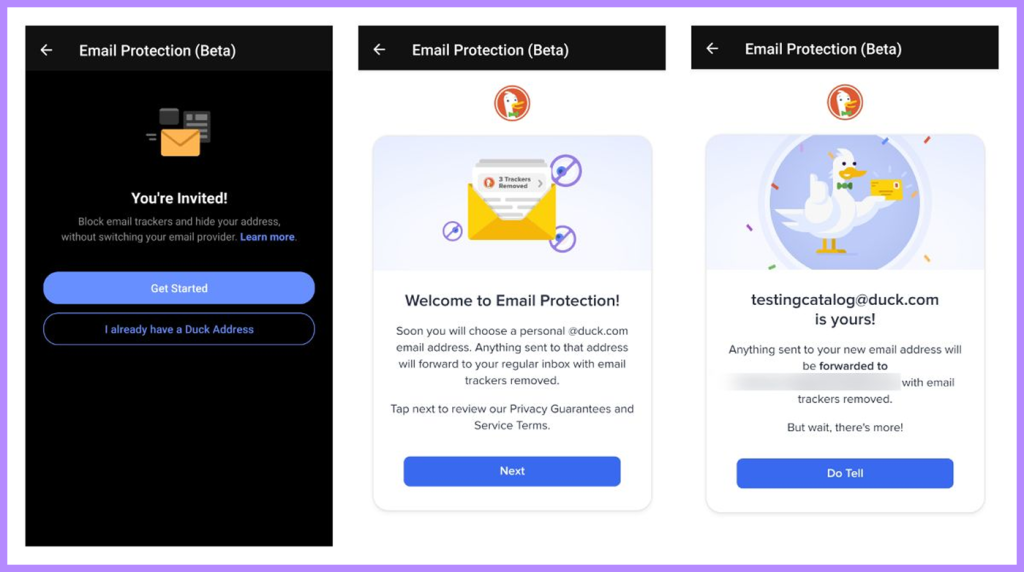
Admittedly, this doesn’t make DuckDuckGo as fully encrypted as proton mail, but still, it does its best to block your incoming emails from being tagged. Let’s take a look.
For every incoming email,an address that ends with “@duck.com” will be assigned to you. This “fake email” will be distributed like your new email address. This is where every incoming email will arrive first.
Then DuckDuckGo will go through it, looking for any trace of hacks that’s attached to the mail and wiping them out if there are any. Then will eventually forward the “clean” mail to your real address.
Given that your DuckDuckGo address doesn’t have an inbox, it’s very important that you have another email account.
Speed & Performance

Browser Performance
We tested the browser and came up with the following results.
For MotionMark, the score for DuckDuckGo is 88.16, which is much lower than Firefox at 373.67 or Chrome at 369.27. This clearly shows the rendering power isn’t impressive when compared to other good competitors.
In terms of speed, DuckDuckGo recorded between 53.2 to 53.8 runs per minute. This is also low when compared to other competitors like Google chrome that runs at 104 per minute and Firefox at 76.4 runs per minute.
Though DuckDuckGo browser has a lower benchmark compared to the other two strong competitors, it still comes up as lightweight because it reduces the usage of resources and extends the device battery performance.
Performance for VPN (Private Pro)
Due to routing your traffic through servers, we noticed the VPN for the paid subscription reduced the download speed to about 33.55% but the upload was fast and swift.
According to our latest 2026 tests, the latency improved by 133.98%. Summing it up, this performance places it somewhat in the middle of the pack with other competitors for speed performance.
To summarise the performance, if speed is what you are after, go for Google Chrome. But if you seek lightweight with minimum resource usage, including no tracking features to protect your privacy, then DuckDuckGo is the best option. You can take that to the bank!
DuckDuckGo Security

It is not a security app. It’s a search engine that has a browser. That’s why expecting DuckDuckGo to give you 100% security protection is not realistic. The search engine should be commended for the level of security it offers, especially with the use of the HTTP encryption protocol for your connection.
Unfortunately, it can’t encrypt your actual URL. That leaves a vulnerability. We recommend the use of a VPN service like NordVPN to mask your true IP address and location. Using the Tor browser is a good alternative.
How Secure is DuckDuckGo?
We continue to see it as a very reliable and safe search engine, the safest. So far, it has not been compromised, which is a good thing. However, the security it offers is dependent on if you remain on their platform or visit websites from search results.
DuckDuckGo cannot offer you security and privacy when you click on links from search results. Neither will it protect you if those sites are malicious in nature.
As good as DuckDuckGo is for a search engine, its security can’t be at the same level as a good anti-virus. But thanks to the HTTPS encryption, DuckDuckGo has the second-best ISP blocker platform after a VPN and that’s saying something.
Also, this encryption now protects the user’s true URL for at least 99% of users. That problem has been taken care of.
Privacy & Logs
DuckDuckGo is a platform that boasts of privacy as its most valued feature. That’s why this section will be very important.
The platform has really lived up to expectations in this aspect. Let’s see how it ranks in that category.
Is DuckDuckGo Really Private?

The good thing about DuckDuckGo privacy policy is that it’s a public document and also legally binding.
According to this document, DuckDuckGo does not keep any information on either browser, website, or search engine, despite using the data only on a temporary basis to offer its services. Does it collect data from searches made by users? Yes, it does. However, it doesn’t connect any of this data to any user. It’s randomly done.
Also, DuckDuckGo prevents your internet service provider (ISP) from seeing everything you do on the platform. Adding to that, it doesn’t allow trackers into the platform. When it uses cookies, it does so privately.
From what we have, DuckDuckGo keeps to its privacy policies but to be sure we didn’t miss anything, we resorted to audits from third parties for confirmation since DuckDuckGo has not done any auditing of their policies.
So far, so good. The only thing that came close to being a negative review was an investigation that showed the platform’s privacy claims are certainly not false advertising. Duly noted, but we need more than this to make negative reviews really count.
Exceptions in DuckDuckGo Privacy
Throughout the history of DuckDuckGo, the only incident that raised concern involved a Microsoft scandal, where DuckDuckGo granted Microsoft access to user data.
There was a mutual agreement between the two companies that since DuckDuckGo uses Microsoft Bing to source searchlight results, they have to allow Microsoft trackers to have access to their data on two websites which were LinkedIn and Bing, and targeting ads on them.
When the public made this information known in 2022, people pushed back, and DuckDuckGo quickly reviewed its policy and stopped Microsoft from accessing its data.
Many users commend them for their swift action, while others remain skeptical about the platform’s motives because it only made changes after being caught. This puts a big question mark on their integrity. Really does.
So what if there are other concerns the public are not aware of. Another issue was DuckDuckGo taking political sides in the Russian misinformation saga during the Ukraine war. For a platform that claimed to be unbiased in their search results to take sides along with other big tech organisations didn’t help their reputation either.
The last one is the platform’s inability to secure users when they go to third party websites. This has nothing to do with reputation but it’s still a privacy concern. They should look into it. For now, you stay protected as long as you don’t click on any third-party links.
User Friendly
We love the site’s interface and the features of the search engine. If you’re accustomed to conventional search engines or Chromium-based browsers, you won’t have any trouble using DuckDuckGo.
Once you install the browser, you will be directed to import your bookmarks and other relevant stuff. And that’s it. From then on, it’s easy to use and highly favoured by users who are less technically knowledgeable.
DuckDuckGo Price

DuckDuckGo is a free web browser. Which begs the question. How do they make money? By selling space that is meant for ads in search results. Of course these ads have no link to the users information or behaviour on the internet.
Your privacy is still intact. After several tests we conducted, we haven’t seen anything that goes contrary to this claim.
DuckDuckGo Without Ads
There is a disadvantage that comes with this sort of ads. It’s impossible to remove such ads from search results on either its apps or browsers. Trust us, we have tried. To make matters worse, the browser version has no support for extensions.
If it had, you would solve this problem by installing another ad blocker or uBlock Origin. The only solution is to search through another browser that has an extension that blocks ads, or so we thought until we found a way.
To enjoy a significant reduction in ads including the ones that come with search results, you have to go to the settings and switch off the “Advertisements” option. This will stop those ads that come with search results.
By default, the DuckDuckGo apps or browsers can block off trackers and a lot of ads from third-party websites. You could also install ad blockers to further reduce chances of them popping up.
We recommend either uBlock Origin or Ghostery, as they offer very aggressive blocking. Don’t forget to use Duck Player when you want to watch videos on YouTube.
Apps and Support
Now that we know what makes DuckDuckGo tick, the next concern is what devices it will work on. Or more precisely, what operating systems it supports. Luckily, most devices used today will be compatible with DuckDuckGo. Let’s have a view:
- Browser extensions: Safari, Opera, Chrome, and Firefox.
- Desktop: Both Windows and macOS are still in beta versions.
- Mobile version: Android and IOS.
Did your device not make the above list? Don’t worry. Just make sure it has a web browser. Through it the user can visit the site.
Customer Support & Service

The Help Page on the website is good with articles that are well written but we seem to have a little issue with it. Most of them are dependent on searches done on the website. It lacks the support that should come from the website’s knowledge data.
We have no problems with the support for the search engine. Why did they make the web browser known publicly without adequate support? That was certainly a bad move on their part.
How to Contact DuckDuckGo
Again, in this section, DuckDuckGo failed to realise the website is more than just a search engine. What we can see on the contact us page lists are addresses meant for legal complaints, media inquiries and stuff like that.
They tell regular users to share complaints concerning search results through the feedback button found on the search page. If you are unfortunate enough to have a technical problem with the mobile app or browser, there really isn’t anywhere to turn to for a solution.
What Makes DuckDuckGo Good?
DuckDuckGo stands as a top-tier, privacy-focused browser and search engine. It prevents third parties from tracking or tampering with user activity, keeping user behavior on the platform highly anonymous. It’s a safer option than Google. It uses more than 400 other directories which includes Yandex, Apple maps, Bing, and Wikipedia, according to a survey by methodandmetric.
The limits of online anonymity were demonstrated in the New South Wales Police arrest of a dark web drug dealer, where investigators successfully traced cryptocurrency transactions and digital footprints back to the suspect, showing that even privacy-conscious criminals can be identified.
It is most useful in avoiding personalized search results and appeals to users who want to have a broader look at things. If your purpose is to find an alternative to Google that provides clean search results and is very private, DuckDuckGo is the place to go to.
As of the time of writing, DuckDuckGo is currently ranked as the 6th most popular search engine in the world. In North America, it is ranked as the 4th most popular, contributing between 0.6% to 0.8% of the total search results in the world with more than 3 billion searches in a month.
As noted earlier, an independent body has yet to review the privacy policy, and the browser can feel somewhat clunky. On the plus side, it offers a user-friendly interface built with simple functions.
Is DuckDuckGo a VPN?

Well, not necessarily. DuckDuckGo is a browser with a privacy-focused search engine. However, it includes an in-built VPN that only users who pay for the “Privacy Pro” subscription, priced at $9.99 per month, can access.
The free version of DuckDuckGo offers protection and privacy by blocking hackers, malware, or phishing tools. Unfortunately, it doesn’t mask your IP address that is unique to VPNs.
Let’s talk about the paid version and its VPN. Compared to some of the best out there, DuckDuckGo inbuilt VPN does the work. We tested it and it unblocked all content found in the Netflix library, to our pleasant surprise.
VPN Tests and Ratings: How We Did It
We thoroughly tested each VPN we mentioned to see if its claims hold up. We conducted third-party testing by checking our internet speed while connected to different servers, verifying whether the kill switch works, and checking for DNS leaks.
Also we wanted to know how good it was in streaming websites like Netflix and the performance if we combine that with our daily activities without hassles. After we finish testing, our editors rate the product or service by considering the important features one would expect from a good product or service.
We grouped each VPN into categories and calculated our five-star yardstick using features, price, security, speed, and server count. Our test results matched the one done by allaboutcookies.
Hacking DuckDuckGo: How Possible is It?

As you use the search engine, DuckDuckGo will protect you from people with bad intentions. It doesn’t leave any information about you or your activities. It does not leave trackable cookies. Without any of these digital footprints, hackers can’t harm your data.
However, after getting your search results, clicking on them takes you away from the safety net of DuckDuckGo privacy protocol. In this scenario, DuckDuckGo can’t protect you. Your safety is dependent on whatever privacy policies the website you are visiting has. If a website is malicious, it can compromise your data.
Speaking of privacy, DuckDuckGo ensures that your internet service provider can see that you are using DuckDuckGo, but cannot see what you do on it. But when you visit any of the websites from your search results, your ISP will see the URL of the site.
To avoid this, we recommend you combine DuckDuckGo with a VPN. Trust us, VPN does come with some benefits. It won’t hurt to throw in a good anti-virus while you are at it.
How Has DuckDuckGo Changed Over Time?
DuckDuckGo has evolved from a conventional search engine to become a much better privacy super app between 2021 and 2025. Initially just a regular search engine.
DuckDuckGo moved towards becoming a privacy based search engine, something other search engines didn’t have between 2010 and 2018. This was when they stopped keeping user search history.
Going beyond being a search engine that defends against hackers and trackers, the platform has included a browser platform, offering protection for emails and AI search functions.
From 2018 to date, the platform has expanded to having mobile apps for Android and IOS. It is important to note that DuckDuckGo grew its features during this period, including the “fire button,” which deletes all browsing history. Smart encryption connections and blocking trackers.
DuckDuckGo eventually provided a private browser for Windows and MacOS for desktops between 2022 and 2023, not as a privacy browser extension of Chrome but to completely replace Chrome.
In 2024, DuckDuckGo introduced a paid subscription called Privacy Pro, which offers identity theft restoration, personal information removal, and a VPN. DuckDuckGo also introduced a feature called !bangs, which users use as short codes to search other websites, and it has grown into a large library.
Speaking of AI, DuckDuckGo introduced an AI feature called DuckAssist, which developers renamed Search Assist between 2023 and 2025. It delivers brief answers using Anthropic models and ChatGPT, reduces vertical space, and protects user privacy.
Looking at statistics of searches on the platform, it went from zero in 2008 to more than 100 million by the time it got to 2021. The platform’s position in the market has been remarkable. As a browsing app, it has become the most downloaded on the Android operating system.
DuckDuckGo is all about privacy. In fact, they haven’t made any money by selling user information and activities at all. However, the decision to stand against Russian misinformation during the Ukraine war didn’t go well with a lot of users.
DuckDuckGo has always claimed to take a neutral stand on search results. But when they decided to deplatform Russian misinformation, it showed the public they weren’t unbiased after all. This made DuckDuckGo lose some credibility in the eyes of most users.
In summary, DuckDuckGo has grown from a conventional search engine to a fully loaded, trusted browser company with the goal of offering a convenient way to enjoy privacy on the internet.
News and Updates
Between 2025 and 2026, developers added several features that improved the website:
- In-built AI: DuckDuckGo has introduced AI features, including a chatbot powered by Anthropic’s Claude and GPT-4o via duck.ai. While still evolving, the chatbot handles simple, clear queries well but may not always provide fully reliable answers. The platform has also added AI-powered image generation.
- Customising search results: Recently, the platform has added a feature that helps the user to block search results that come from at least five domains. Users widely welcome this change, and it helps close the gap between DuckDuckGo and Google in terms of personalized search results. This is a good one.
- Development of Browser: The DuckDuckGo browser used on macOS and Windows operating systems is now in public beta. Developers have added features like private bookmarks, private sync, and private passwords. These guys mean business.
- Reduced vulnerability: There was a certain vulnerability found on the Android browsers known as “CVE-2025-4846,” and that has been taken care of on the latest 5.247.0 version.
- Security improvement: DuckDuckGo has upgraded its security features to block ads, trackers, malware, and phishing tools, thanks to scam blockers powered by Netcraft.
DuckDuckGo Reviews & Complaints

We took our time to gather reliable user reviews on DuckDuckGo web browser and search engine. We have listed out some of the most common complaints of the platform:
- The interface: Some users have shown their dislike for the visual aspect of the user interface, saying it’s less appealing compared to other good browsers. Including being less intuitive too.
- Limiter features: Some people say DuckDuckGo lacks advanced features that other alternatives offer, such as special extensions and broader customization options.
- No independent audits: Usually, a website or company builds a high level of trust when an independent platform vets its policies. DuckDuckGo has yet to have its privacy policies publicly audited.
- Performance concerns: There have been complaints about slow speed notices, especially when dealing with complex graphics or website applications. Much slower than other browsers.
- Privacy issues: The previous problem of allowing trackers from Microsoft to have access to data remains a major concern for the public to date.
- Compatibility issues: There are folks who have complained about some web functions malfunctioning at times, and also some websites not displaying properly.
DuckDuckGo Alternatives
As we pointed out earlier, DuckDuckGo has some minor security lapses that you can significantly reduce by using reliable VPN apps. Here are the three best alternatives to DuckDuckGo:
| NordVPN | Aura | Surfshark | |
|---|---|---|---|
| Prices | $3.39–$25.29 per month | $9.00–$30.00 per month | $2.49–$20.85 per month |
| Encryption protocol | AES-256 | AES-128 | AES-256-GCM |
| Free version | No | No | No |
| No logs policy | Yes | Yes | Yes |
| Identity theft services | Yes | Yes | Yes |
| Netflix access | Yes | No | Yes |
| VPN system | Over 8000 servers in 120+ countries | Not listed | The system uses the following encryption: WireGuard, IKEv2, and Open VPN |
| Number of servers | Over, 8000 servers in 120+ countries | Not listed | Over 3,000 servers in 100+ countries |
| Highest number of connected devices | 10 | 10 | Unlimited |
| Safe browsing | Yes | Yes | Yes |
| Data removal service | No | Yes | Yes |
Conclusion
Despite some obvious hiccups, such as performance issues and lagging behind other brands in that area, and despite users raising privacy concerns, DuckDuckGo still stands as the safest and most private search engine in the world. After all, it was the first of such search engines to go online and has proven to be difficult to hack so far.
Although the desktop version is still in beta version, it has shown the potential to become better in the future and possibly close some of the gaps in performance and looks when compared to other browsers or search engines.
If safety and privacy are your thing, we recommend DuckDuckGo and it’s the next best thing after a reliable VPN. Having said that, it’s best to combine DuckDuckGo with a VPN. Or better still, subscribe to the Privacy Pro to activate the VPN in DuckDuckGo.
FAQs
No. DuckDuckGo can block malicious malware from getting in, but doesn’t have the ability to eliminate them the way anti virus does.
Unless you are willing to pay for the Privacy Pro, you won’t have access to the inbuilt VPN on DuckDuckGo.
There is a toggle to either turn it on or off. It’s not complicated at all. We can say it’s user-friendly. We were also happy with how effective it was in terms of security.
Yes, DuckDuckGo is a free, legal, privacy-focused search engine and browser available across major platforms. It generates revenue through search-based ads rather than tracking users, and it does not store personal search history, helping protect user privacy.